itfan123
Python+Pytest+Selenium+Allure搭建Web自动化测试框架并接入Jenkins
原创免费下载 Python+Pytest+Selenium+Allure搭建Web自动化测试框架并接入Jenkins(夸克网盘,免费获取,无需注册)
| 资源名称 | Python+Pytest+Selenium+Allure搭建Web自动化测试框架并接入Jenkins |
|---|---|
| 下载方式 | 夸克网盘 |
| 是否免费 | 免费 |
| 提取码 | 无需提取码 |
框架简介:这套 Web 自动化测试框架是什么
Python + Pytest + Selenium + Allure 是一套开源的 Web 自动化测试框架组合:Python 承担逻辑控制,Pytest 组织测试用例,Selenium 驱动浏览器完成点击、填表、跳转等界面操作,Allure 把执行结果渲染成可视化报告。它适合需要频繁做界面回归的测试人员与开发工程师,尤其是教育平台、SaaS 这类迭代快、前端交互密集的 Web 项目。本文配套的实战方案来自课堂派在线教育平台的测试实践,已落地到 Jenkins 流水线持续运行。
技术栈与版本参数
| 组件 | 推荐版本 | 作用 |
|---|---|---|
| Python | 3.8 ~ 3.11 | 编程语言,承担框架逻辑 |
| Pytest | 7.x | 用例组织、参数化、fixture 管理 |
| Selenium | 4.6 以上 | 浏览器驱动与元素操作,自带 Selenium Manager |
| allure-pytest | 2.13.x | 生成 Allure 结果文件 |
| Allure | 2.17+ | 命令行渲染测试报告 |
| Jenkins | 2.3xx LTS | 持续集成,定时触发回归 |
环境准备与安装步骤
- 安装 Python 3.8 及以上版本,命令行验证:
python --version。 - 创建并激活虚拟环境:
python -m venv venv;Windows 执行venv\Scripts\activate,Linux/macOS 执行source venv/bin/activate。 - 安装测试依赖:
pip install pytest selenium allure-pytest,使用旧版 Selenium 时追加webdriver-manager。 - 安装 Allure 命令行(2.17+):macOS 用
brew install allure,Windows 用 Scoopscoop install allure,Linux 下载官方包解压后把bin目录加入 PATH,用allure --version验证。 - 浏览器驱动无需手动维护:Selenium 4.6 以上由 Selenium Manager 自动匹配 Chrome/Edge 驱动版本。
用例编写与 Allure 报告生成
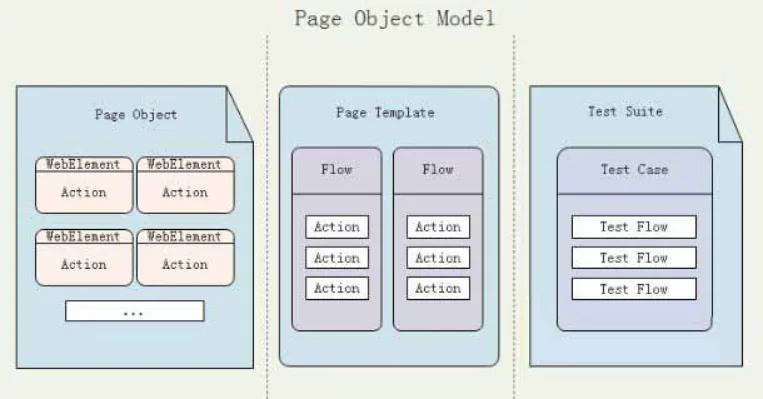
推荐按页面对象(PO)模式分层:
autotest/
├── config/          # 环境地址、账号配置
├── pages/           # 页面对象层
├── tests/           # 测试用例
├── conftest.py      # fixture 集中管理
├── pytest.ini       # pytest 配置
└── requirements.txt
pytest.ini 示例:
[pytest]
addopts = -v -s --alluredir=./allure-results
testpaths = tests
参数化用例示例:
import pytest

@pytest.mark.parametrize("user,pwd", [
    ("student01", "Aa123456"),
    ("teacher01", "Aa123456"),
])
def test_login(user, pwd):
    ...
执行并查看报告:
pytest --clean-alluredir --alluredir=./allure-results
allure serve ./allure-results需要归档时导出静态报告:allure generate ./allure-results -o ./allure-report --clean,该目录可直接交给 Jenkins 发布。
Jenkins 持续集成配置
- 在 Jenkins 的"插件管理"中安装 Allure Jenkins 插件。
- 新建任务,源码管理填入 Git 地址;构建步骤执行 Shell:先
pip install -r requirements.txt,再pytest --alluredir=allure-results。 - 构建后操作选择 Allure Report,Results 目录填
allure-results,构建历史中即可看到报告趋势图。 - 勾选"Build periodically"并填写
H/30 * * * *,实现每 30 分钟自动回归一次。
常见问题与版权说明
Q1:pytest 报错 "unrecognized arguments: --alluredir"?
allure-pytest 插件未安装或装到了其他 Python 环境。执行 pip install allure-pytest,并用 python -m pytest --version 确认运行命令与安装位置一致。
Q2:SessionNotCreatedException,提示 chromedriver 版本不匹配?
Chrome 升级后驱动未同步。把 Selenium 升级到 4.6 以上(pip install -U selenium),Selenium Manager 会自动下载匹配版本;旧方案需手动更换与浏览器一致的 chromedriver。
Q3:命令行执行 allure 提示 "command not found"?
pip 安装的 allure-pytest 只产生结果文件,报告渲染依赖独立的 Allure 命令行工具。确认已安装 Allure 2.17+ 并将 bin 目录写入 PATH,重启终端后再执行 allure --version。
Q4:NoSuchElementException,元素定位失败?
多为页面未加载完成或元素嵌套在 iframe 中。用 WebDriverWait 配合 expected_conditions 做显式等待,iframe 内元素需先 driver.switch_to.frame() 切换,并在测试环境确认定位符唯一。
版权说明:Python、Pytest、Selenium、Allure、Jenkins 均为开源项目,遵循各自开源协议;项目代码仅供学习参考,运行前请确认已获得目标系统授权,切勿对生产环境执行自动化操作。下载方式见文末。
下载地址
百度网盘链接如带 ?pwd= 参数,请完整复制到浏览器打开。
以上资源由网络收集整理,版权归原作者及软件厂商所有,请在授权范围内使用;如涉及侵权请联系本站删除。
常见问题
这个资源需要付费吗?不需要,本文提供的资源可免费获取。
下载需要注册网盘账号吗?不需要注册,打开网盘链接即可保存或下载。
有提取码吗?无需提取码,打开网盘链接即可转存或下载。
版权声明
所有资源都来源于爬虫采集,如有侵权请联系我们,我们将立即删除
-
fetch_20newsgroups 下载慢?离线导入 20news-bydate.tar.gz 四步解决
-
Qt 启动提示找不到 python36.dll?Windows 修复步骤与常见问题
-
matplotlib 中文乱码怎么解决?SimHei 字体设置步骤与示例代码
-
Python导入OpenCV报错DLL load failed?3步解决找不到指定模块问题
-
解决Python安装依赖包时报错Microsoft Visual C++ 14.0 or greater的方法
-
Python 报错 Could not locate zlibwapi.dll:解决步骤与常见问题
-
Python3安装PyHook3报错解决:missing positional arguments 完整修复步骤
-
ROS小车视觉检测脚本:Python+OpenCV实时障碍物识别(Melodic/Noetic,附常见问题)
-
车牌号码识别程序Python OpenCV:安装步骤、运行方法与常见问题

-
车流量数据集PeMS-SF:车道占有率与10分钟采样预测应用