itfan123
安全帽佩戴检测数据集训练YOLOv5:XML转TXT、目录组织与可视化全流程(附网盘资源免费下載)
原创数据集下载与解压
这是一份面向目标检测初学者与算法落地工程师的安全帽佩戴检测数据集处理教程,覆盖 YOLOv5 训练前从解压到启动训练的完整流水线。数据集压缩包内包含图片与 XML 标注文件,推荐在 Google Colab 上挂载 Google 云端硬盘后直接解压,省去本地下载时间:
from google.colab import drive
drive.mount('/content/drive')

# 假设压缩包已上传到 Drive 的 datasets 目录
!unzip /content/drive/MyDrive/datasets/helmet.zip -d /content/helmet
无法访问 Google 的用户可按文末提示的备用方式获取。解压后进入 Images 与 Annotations 目录,确认图片与 XML 标注数量一致后再进行下一步。下载方式见文末。
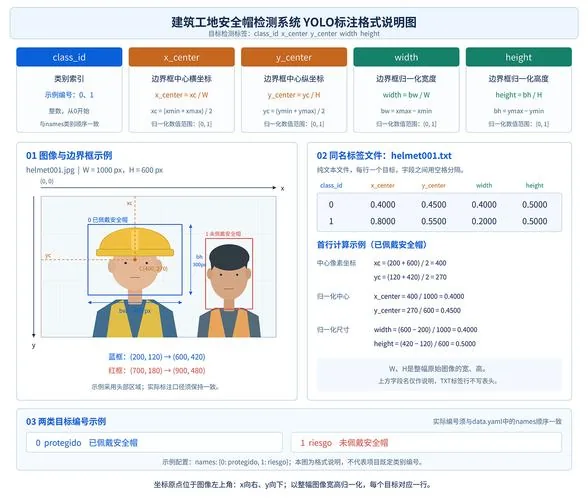
XML 标注转 YOLOv5 的 TXT 格式
原始标注是 Pascal VOC 风格的 XML,而 YOLOv5 要求每张图对应一个同名 txt,每行一个目标,格式为 类别id 中心x 中心y 宽 高,坐标均为相对图片宽高的归一化值,类别 id 从 0 开始顺序编号。用以下脚本批量转换:
import os
import xml.etree.ElementTree as ET
from tqdm import tqdm

# 按数据集实际类别顺序修改,顺序必须与训练时一致
classes = ['head', 'helmet', 'person']

def convert(size, box):
    dw, dh = 1.0 / size[0], 1.0 / size[1]
    x = (box[0] + box[1]) / 2.0
    y = (box[2] + box[3]) / 2.0
    w = box[1] - box[0]
    h = box[3] - box[2]
    return x * dw, y * dh, w * dw, h * dh

def convert_annotation(xml_path, txt_path):
    tree = ET.parse(xml_path)
    root = tree.getroot()
    size = root.find('size')
    w, h = int(size.find('width').text), int(size.find('height').text)
    with open(txt_path, 'w') as out:
        for obj in root.iter('object'):
            cls = obj.find('name').text
            if cls not in classes:
                continue
            cls_id = classes.index(cls)
            bnd = obj.find('bndbox')
            box = (float(bnd.find('xmin').text), float(bnd.find('ymin').text),
                   float(bnd.find('xmax').text), float(bnd.find('ymax').text))
            out.write(f"{cls_id} {' '.join(f'{v:.6f}' for v in convert((w, h), box))}\n")

xml_dir = 'helmet/Annotations'
txt_dir = 'helmet/labels'
os.makedirs(txt_dir, exist_ok=True)
for xml_file in tqdm(os.listdir(xml_dir)):
    if xml_file.endswith('.xml'):
        convert_annotation(os.path.join(xml_dir, xml_file),
                           os.path.join(txt_dir, xml_file.replace('.xml', '.txt')))
转换完成后核对:XML 与 TXT 数量一致,每个 txt 至少有一行内容;空文件表示该图无目标,可保留。
目录结构与 data.yaml 组织
YOLOv5 要求图片与标签分目录存放,按 train/val/test 划分(常见比例为 8:1:1):
dataset/
├── images/
│   ├── train/
│   ├── val/
│   └── test/
└── labels/
    ├── train/
    ├── val/
    └── test/
用脚本把文件复制到对应目录,注意图片与标签的文件名必须完全一致:
import os, shutil

for split in ['train', 'val', 'test']:
    os.makedirs(f'dataset/images/{split}', exist_ok=True)
    os.makedirs(f'dataset/labels/{split}', exist_ok=True)
    # 按划分文件列表复制,示例:
    # for name in split_file_list[split]:
    #     shutil.copy(f'Images/{name}.jpg', f'dataset/images/{split}/{name}.jpg')
    #     shutil.copy(f'labels/{name}.txt', f'dataset/labels/{split}/{name}.txt')
然后在 YOLOv5 项目的 data 目录下新建 helmet.yaml:
path: ./dataset
train: images/train
val: images/val
test: images/test

nc: 3
names: ['head', 'helmet', 'person']
names 的顺序必须与转换脚本中的 classes 列表严格一致,否则训练时类别会整体错位。
数据集可视化
训练前用 seaborn 统计各类别目标框数量与分布,快速判断类别是否均衡:
import glob, seaborn as sns, matplotlib.pyplot as plt
from collections import Counter

cnt = Counter()
for txt in glob.glob('dataset/labels/train/*.txt'):
    with open(txt) as f:
        for line in f:
            cnt[classes[int(line.split()[0])]] += 1

sns.barplot(x=list(cnt.keys()), y=list(cnt.values()))
plt.title('Class distribution in train set')
plt.show()
若 helmet 与 person 数量悬殊,可在训练时补充少量样本,避免模型对少样本类别欠拟合。
训练命令与参数说明
环境建议 Python 3.8+、PyTorch 1.7 及以上,以 YOLOv5 v7.0 为例,在项目根目录执行:
python train.py --data data/helmet.yaml --cfg models/yolov5s.yaml \
--weights yolov5s.pt --img 640 --batch-size 16 --epochs 100 \
--workers 8 --name helmet_exp关键参数说明:--img 640 为输入分辨率;--batch-size 16 为批大小,显存不足时降到 8;--weights yolov5s.pt 使用官方预训练权重做迁移学习;--device 0 指定 GPU,无 GPU 时用 --device cpu 先跑通流程。训练日志默认保存在 runs/train/helmet_exp 目录,best.pt 与 last.pt 位于其中的 weights 文件夹。
常见问题与注意事项
Q:运行 train.py 报错 No such file or directory: data/helmet.yaml?
A:确认在 YOLOv5 项目根目录执行命令,且 --data 后的路径与 helmet.yaml 实际位置一致;Colab 中若挂载了 Drive,注意加上 /content/drive/MyDrive/ 前缀。
Q:转换出的标签与图片对不上?
A:检查 txt 文件名是否与图片主名完全一致(区分大小写、不含扩展名),并确认转换脚本已遍历全部 XML 文件。
Q:训练时报 CUDA out of memory?
A:把 --batch-size 从 16 降到 8 或 4,或把 --img 从 640 降到 416;显存紧张时可先以 --device cpu 验证流程。
Q:验证 mAP 一直为 0?
A:依次检查:txt 中类别 id 是否从 0 连续编号;data.yaml 的 names 顺序与转换脚本 classes 是否一致;train 与 val 路径是否指反。
注意事项:Python 环境需安装 os、sys、shutil、xml.etree.ElementTree、tqdm 等依赖;使用 Google Colab 训练前确认已挂载 Google 云端硬盘并核对路径;Windows 用户避免把数据集放在含中文或空格的路径下,否则可能出现图片读取失败。数据集仅供学习研究使用,请勿用于商业用途。
下载地址
百度网盘链接如带 ?pwd= 参数,请完整复制到浏览器打开。
以上资源由网络收集整理,版权归原作者及软件厂商所有,请在授权范围内使用;如涉及侵权请联系本站删除。
版权声明
所有资源都来源于爬虫采集,如有侵权请联系我们,我们将立即删除
-
SolidWorks 2019许可证错误(-8,544,0)解决方法:netapi32.dll替换步骤(附网盘资源免费下載)

-
sklearn fetch_20newsgroups 下载 403 Forbidden 解决方法(附网盘资源免费下載)

-
Proteus 仿真 ADC083X.DLL not found 报错的解决方法与步骤(附网盘资源免费下載)

-
Postman安装失败:.NET Framework 4.5.2报错解决与安装步骤(附网盘资源免费下載)
-
PL2303_Prolific U转串驱动在Win64位系统报Error 10的解决与安装步骤(附网盘资源免费下載)

-
NLTK WordNetLemmatizer 报 BadZipFile 错误?omw-1.4.zip 解决步骤与常见问题(附网盘资源免费下載)

-
MapGIS ms cannot allocmem报错:两种修复方法与常见问题(附网盘资源免费下載)

-
matplotlib报错MovieWriter ffmpeg unavailable:ffmpeg安装与环境变量配置(附网盘资源免费下載)

-
Keras 导入报错解决:缺少 populate_dict_with_module_objects 属性(附网盘资源免费下載)

-
Keil code size超限报错解决:许可证、代码裁剪、换芯片与常见问题(附网盘资源免费下載)